Convert anything. Nothing leaves your phone.

Free offline PDF, photo and file converter for Android

Share a photo, PDF, video or document to Convert+, tap a format, and get the new file back. Every tool runs on the phone itself, so nothing is uploaded.

Works offline. No ads, no login, no account.

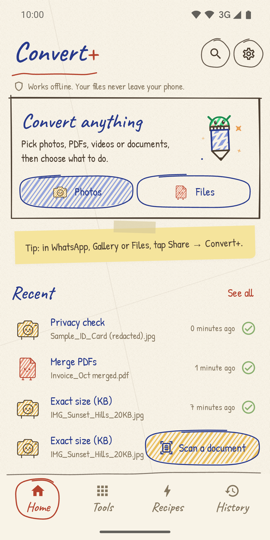
Tip: in WhatsApp, Gallery or Files, tap Share → Convert+.
The Convert+ home screen: a 'Convert anything' card with Photos and Files buttons, and a list of recent results
Robo Jadoo, the Convert+ mascot: a pencil with an Android robot head

How it works

Convert a file in three taps from any app on your Android phone.

  1. Share a file to Convert+

    In Gallery, WhatsApp, Files or any other app, tap Share and pick Convert+. You can also open the app and tap Photos or Files.

  2. Pick a format on the wheel

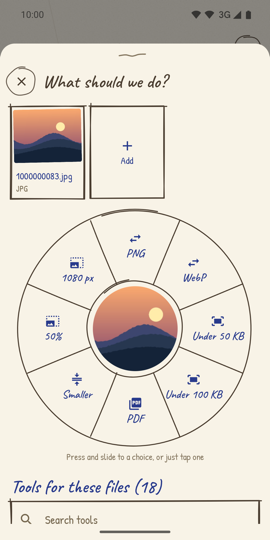
    The wheel shows the formats and sizes that make sense for that file. Tap one, or press and slide to it. Every other tool is listed below the wheel.

  3. Open, share or save

    The new file is ready in a moment. Send it straight to WhatsApp or email, save it to your phone, or do one more thing with it.

What should we do?

Sunset.jpg
JPG · 2.4 MB

Press and slide to a choice, or just tap one

The share pop-up: a photo in the middle of a wheel with PNG, WebP, Under 50 KB, Under 100 KB, PDF, Smaller, 50% and 1080 px around it

What it can do

About 80 PDF, photo, document, video and file tools, all on the phone.

Photos for exam and job forms

  • Resize a photo to an exact size in KB
  • Presets for SSC, UPSC, NEET, JEE, CUET and bank exams (IBPS, SBI, RRB)
  • Clean up signature and thumb impression photos
  • Passport photo sheet
  • JPG, PNG, WebP, HEIC, BMP and TIFF; resize, compress, crop, black & white
  • Remove location and other hidden details
PDF tools

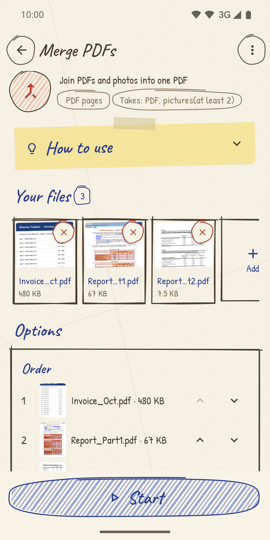
  • Merge, split, reorder, rotate, delete or extract pages
  • Compress a PDF to a target size, like under 1 MB or 200 KB
  • Photos to PDF, PDF to photos, scan with your camera
  • Lock with a password, or unlock
  • Watermark, page numbers, header & footer, Bates numbers
  • Sign, add text, fill forms, flatten, night mode, repair, compare

PDF to Word, Excel and more

  • PDF to Word, Excel, PowerPoint, HTML, EPUB and Markdown
  • Bank statement PDF to Excel, with a balance check
  • Word, Excel, PowerPoint, text, Markdown, HTML and EPUB to PDF
  • Old Kruti Dev Hindi PDFs become normal Unicode Hindi

Privacy tools

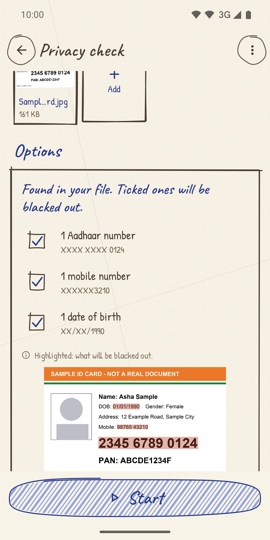
  • Privacy check: finds Aadhaar, PAN, GSTIN, IFSC and card numbers in your files
  • Mask Aadhaar: hide the first 8 digits before you share it
  • True redaction: removes the text, not just covers it
  • OCR in English, Hindi, Bengali, Gujarati, Kannada, Malayalam, Odia, Punjabi, Tamil and Telugu
  • Picture to text

Video and audio

  • Compress and convert video (MP4, MKV, AVI)
  • Trim, join, mute and resize videos
  • Take the audio out of a video, convert to MP3
  • Video to GIF, photos to GIF, save frames
  • Read a PDF aloud

Files

  • Make ZIP files, with a password if you want
  • Open ZIP, RAR, 7z, TAR and GZ files
  • Convert subtitles (SRT, VTT)
  • CSV to Excel and Excel to CSV
  • File hash (MD5, SHA-1, SHA-256, SHA-512)

Recipes: many steps in one tap

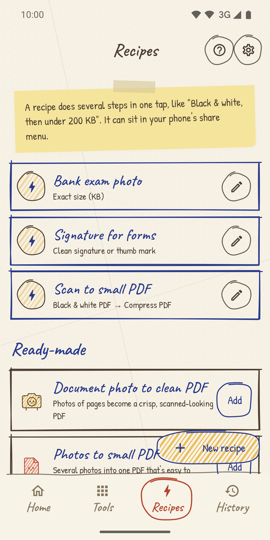
  • Save steps like "Black & white, then under 200 KB" as a recipe
  • Put it in your share menu and run it with one tap
  • Ready-made recipes for the common jobs

Why Convert+

Works without internet

Every tool runs on your phone. It goes online only to check for a new version and to show our other apps.

No storage permission

On new phones you pick the files. The app never looks through your phone.

No ads, no login

No account, no tracking, no analytics. Nothing to sign up for.

Big jobs keep running

Long videos and big PDFs carry on in the background with a progress notification.

Phones, tablets and foldables

Made for portrait and landscape, with two panes on big screens.

Open source

The code is on GitHub, so you can see for yourself that nothing is uploaded.

A look inside

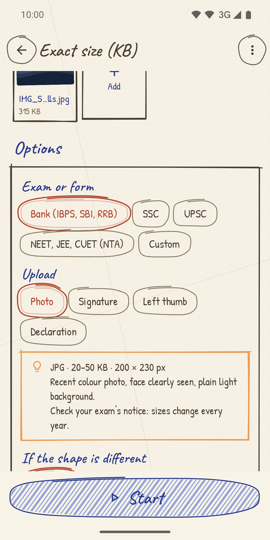
Exact size (KB) tool with exam presets
Exact KB for exam forms
Merge PDFs tool with pages in order
Merge PDFs
Privacy check finding an Aadhaar number in an ID card photo
Privacy check
Recipes screen with saved multi-step recipes
Recipes

Questions people ask

Does Convert+ upload my files?

No. Every tool runs on your phone. The app goes online only to check for a new version and to show our other apps. There is no account, no analytics and no ads.

Can it make a photo exactly 20 KB or 50 KB for an exam form?

Yes. The Exact size (KB) tool shrinks a photo or signature to the size you type, and has presets for SSC, UPSC, NEET, JEE, CUET and bank exams. Always check your exam's official notice, because sizes change every year.

Can it convert a PDF to Word or Excel without the internet?

Yes. PDF to Word, Excel, PowerPoint, HTML, EPUB and Markdown all run on the phone, including bank statements to Excel with a balance check.

Does it work on tablets?

Yes. Convert+ is made for phones, tablets and foldables, in portrait and landscape, and needs Android 8.0 or later.

Is Convert+ free?

Yes. It is free on Google Play, with no ads and no login. The source code is on GitHub.

Your files never leave your phone

Convert+ has no account, no analytics and no ads. Your files are processed on the phone and saved where you choose. The only things the app ever downloads are its own update notice and the list of our other apps.

Read the privacy policy

Exam photo sizes change every year, so always check your exam's official notice. Convert+ is not linked to any government body or exam board.